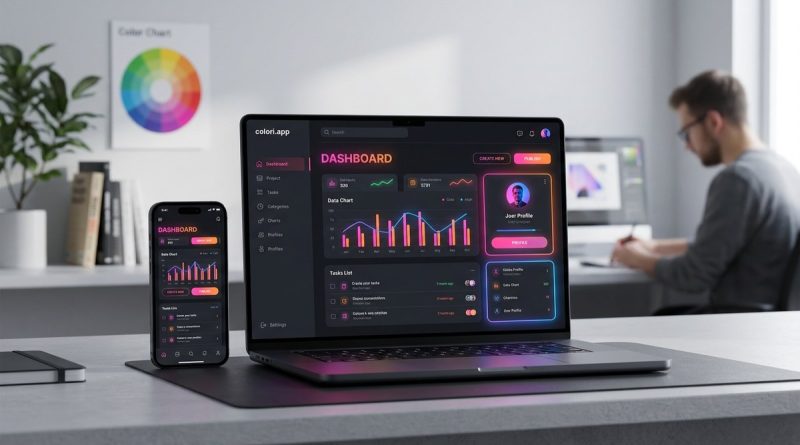
Can You Use Neon Colors Without Breaking Your UI?
Neon colors grab attention. They glow, they pulse, and they feel electric. But if you have ever tried using a highlighter-pink button or a lime-green background in a real interface, you already know the risk. One wrong move and your design looks like a carnival ticket booth instead of a polished app.
The good news is that neon colors can work in UI design. You just need to understand how to control them. When you treat neon hues as accents instead of foundations, and when you pair them with enough neutral space, they become powerful tools instead of usability nightmares.
Neon colors can succeed in UI design when used as intentional accents, not dominant backgrounds. The secret is pairing high-saturation hues with plenty of neutral space, maintaining strong contrast ratios, and reserving neon for interactive elements that benefit from visual energy. Follow accessibility guidelines and test your palette against WCAG standards to keep your design both bold and usable.
Why neon colors feel risky in UI
The problem with neon colors is not the colors themselves. It is how our eyes react to them. High-saturation hues at full brightness create a lot of visual noise. When you cover a large area with a neon shade, the effect is overwhelming. Text becomes hard to read. Adjacent elements lose their hierarchy. The user feels tired after a few seconds.
Think about the last time you opened a website with a hot pink background and cyan text. You probably closed it within two seconds. That is because the human visual system struggles to process high-saturation light across large surfaces. It creates a sensation of vibration or fuzziness around edges. Designers call this the “halation” effect.
But here is the thing. Neon colors are not bad. They are just misunderstood. The real skill is knowing when and where to use them.
The role of neon in modern UI (2026 trends)
In 2026, neon colors are showing up in some of the most popular apps and websites. You see them in gaming interfaces, music streaming platforms, fitness trackers, and youth-oriented social apps. The key difference is that these designs use neon sparingly.
The most common applications include:
- Call-to-action buttons that need to stand out
- Progress indicators and loading animations
- Notification badges and alerts
- Accent borders or underlines on interactive elements
- Background gradients where the neon hue is heavily desaturated
Notice a pattern. Neon is doing a job. It is not just decoration. Every neon element serves a clear functional purpose. That is the first rule of using high-saturation color in UI.
Three steps to add neon without breaking your interface
If you want to introduce neon colors into your next project, follow this process. It keeps the energy high and the usability intact.
-
Start with a neutral base. Choose a background that is either very light (white, off-white, light gray) or very dark (near-black, deep navy, charcoal). This gives the neon color room to breathe. A neon accent on a white background feels energetic. The same neon on a busy patterned background feels chaotic.
-
Limit neon to 10 percent of the screen. Follow the 60-30-10 rule of color distribution. Your dominant color covers 60 percent of the interface. Your secondary color covers 30 percent. Your accent color, where the neon lives, covers the final 10 percent. This ratio keeps the eye calm while still providing visual pop. For more on this approach, check out how to use the 60-30-10 rule for balanced UI color schemes.
-
Test for contrast compliance. Use a contrast checking tool to make sure your neon color meets WCAG AA standards against the background. Neon green on white often fails because the contrast ratio is too low. Neon pink on dark navy usually passes with room to spare. Always verify before you ship.
Common mistakes and how to fix them
Even experienced designers slip up when working with neon. Here is a table that breaks down the most frequent errors and the corrections you can apply.
| Mistake | Why it hurts | The fix |
|---|---|---|
| Using neon as a background color | Creates visual vibration and makes text unreadable | Move neon to small accent elements like icons or borders |
| Pairing two neon colors together | Causes color clash and reduces legibility | Keep only one neon hue per screen; use neutrals for the rest |
| Ignoring color blindness considerations | Excludes up to 8 percent of male users | Add text labels or icons alongside neon indicators |
| Applying neon to large body text | Strains the eyes and reduces reading speed | Reserve neon for headlines or small decorative type only |
| Forgetting to test on mobile screens | Neon looks different on OLED displays | Always preview on an actual phone before finalizing |
Each of these fixes is straightforward. The hard part is catching the mistake before it ships. That is why testing with real users and real devices matters so much.
Accessibility is not optional
Neon colors pose a special challenge for accessibility. High-saturation hues can be difficult to distinguish for people with color vision deficiencies. Red-green color blindness is the most common type, which means neon green and neon red might look almost identical to a significant portion of your audience.
Here are a few ways to keep your neon design inclusive:
- Never rely on color alone to convey information. If a neon badge means “new message,” also include a small icon or a text label.
- Use patterns or textures alongside neon elements when possible.
- Check your palette against a color blindness simulator before launch.
- Maintain a minimum contrast ratio of 4.5:1 for small text and 3:1 for large text.
If you want to go deeper on this subject, read about designing accessible UI color schemes for inclusivity and usability. It covers the full spectrum of inclusive color practices.
“Neon is a spotlight, not a floodlight. Use it to direct attention, not to drown it.”
When neon works best: real scenarios
Let us look at a few specific situations where neon colors shine without breaking the interface.
Music and entertainment apps. Streaming platforms often use neon gradients for playlist covers and artist pages. The dark background of a night mode interface provides the perfect canvas. A neon magenta or cyan accent feels immersive without being distracting.
Gaming dashboards. Game UIs have been using neon for years. The trick is that gaming interfaces usually have dark backgrounds and heavy use of glowing effects that mimic in-game lighting. The neon feels natural because it matches the visual language of the game world.
Fitness and health trackers. A neon green ring around a step counter or a neon orange pulse animation for a heart rate readout works well. These are small, circular elements that benefit from high visibility. The user glances at them for a split second and gets the information they need.
Call-to-action buttons. A neon button on a clean white page draws the eye immediately. This is one of the safest places to use neon because the button is small and the intent is clear. Just make sure the button text has enough contrast against the neon background.
The science behind neon and readability
Understanding why neon can be hard to read helps you make better design choices. When you look at a neon color, your eyes try to focus on a wavelength of light that is very intense. The lens of your eye has trouble bending that light precisely onto the retina. The result is a slight blur or halo around the edges of the neon element.
This effect is strongest with pure hues at maximum saturation. If you reduce the saturation by 20 or 30 percent, the halation effect drops significantly. The color still looks bright and energetic, but it no longer creates that uncomfortable fuzziness.
Another factor is the background value. A neon color on a white background creates a high-frequency vibration that fatigues the eyes. The same neon color on a dark background feels smooth and controlled. That is why most successful neon designs use dark mode or near-black backgrounds.
For a broader look at how color choices affect user behavior, spend some time with using color psychology to enhance user engagement in web design. It connects the dots between color selection and user response.
Tools to help you choose and test neon palettes
You do not have to guess whether your neon palette works. Several tools can help you test and refine your choices.
- Contrast checkers. Plug your foreground and background hex codes into a WCAG contrast validator. It will tell you if your combination passes AA or AAA standards.
- Color blindness simulators. These tools show you how your design looks to users with different types of color vision deficiency.
- Saturation sliders. Use a color picker that lets you adjust saturation and lightness independently. Start at full saturation and pull back until the color stops vibrating.
- Real device preview. Always view your design on an actual phone or monitor. Neon colors render differently on glossy screens, matte screens, and OLED panels.
A practical checklist for your next neon UI
Before you finalize a design that includes neon colors, run through this list.
- Is the neon color used on less than 10 percent of the screen?
- Is the background either very light or very dark?
- Does the neon element have a clear functional purpose?
- Have you tested the contrast ratio against WCAG standards?
- Does the design still communicate its message in grayscale?
- Have you checked the palette with a color blindness simulator?
- Does the neon element include a secondary cue like an icon or label?
If you can answer yes to all seven questions, your neon UI is ready to ship.
Why neon belongs in your 2026 toolkit
The design world has moved past the era of flat, muted everything. Users respond to energy and personality. Neon colors, when used with intention, deliver that energy without sacrificing usability. They signal modernity, confidence, and a touch of playfulness.
The brands that do this well understand that neon is a seasoning, not the main dish. A dash of neon green on a dark dashboard makes the data feel alive. A neon pink button on a clean white page invites a click. A neon blue gradient behind a music player interface sets the mood.
If you are still nervous about using neon, start small. Pick one element on one screen. Apply a neon accent. Test it with a few users. See how it feels. Then iterate from there.
For a more structured approach to building your overall color strategy, read mastering color palette selection for stunning web designs. It walks you through the full process from research to final polish.
Your next step with neon
You now have everything you need to start using neon colors in your UI designs without breaking usability or accessibility. The principles are simple. Use neon sparingly. Keep the background calm. Test for contrast. Never rely on color alone.
The next time you open your design tool, try adding a single neon accent to a wireframe that feels flat. Watch how the entire composition comes to life. That is the power of neon when you respect its limits.
Start with one button. One icon. One small element. See what happens. You might be surprised at how much impact a little bit of neon can bring to your work.